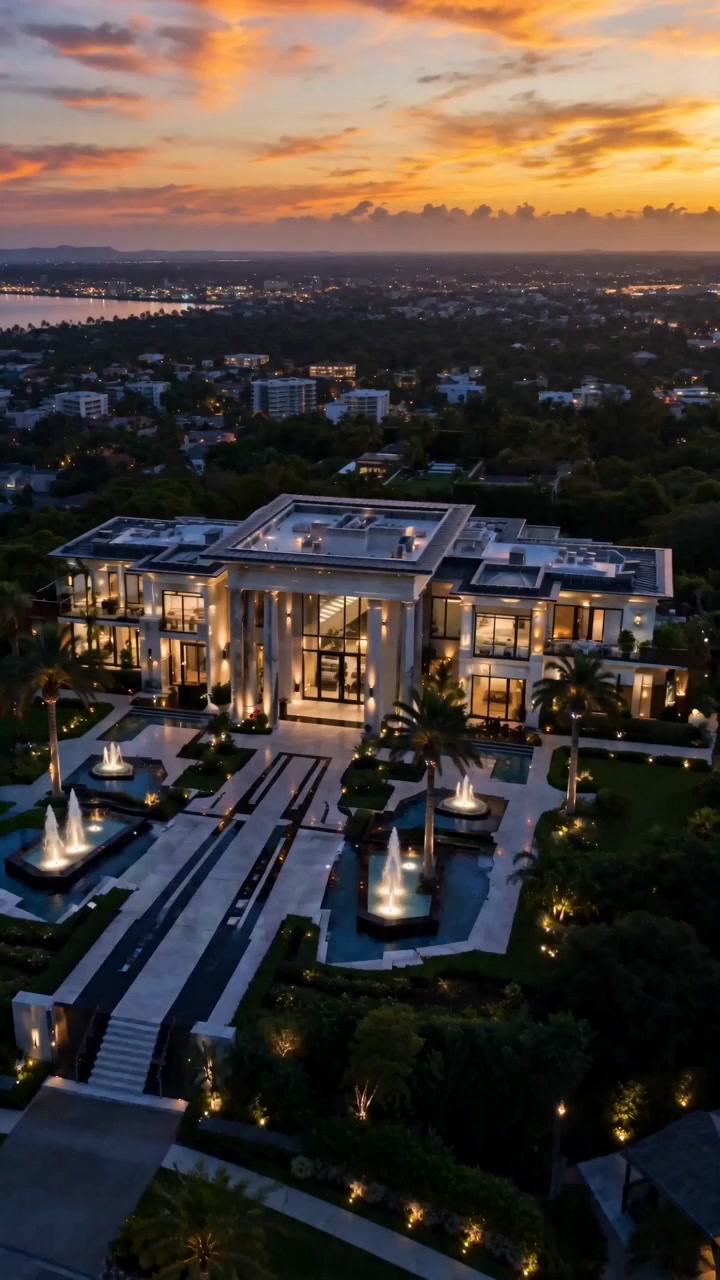
Fifteen photographs in, one walkthrough out
The order you upload them in is the order the buyer walks the house. Add a presenter and they carry the tour; the run returns a single finished video.
- Up to fifteen photographs In the order you want the house walked — front door, hall, living room.
- A presenter, optionally Bring an avatar and they guide the tour instead of the camera alone.
- A template The grammar of the shot: luxury lingers, architectural tilts, cinematic drifts and holds.
- A length and a resolution Eight, twelve, fifteen or thirty seconds, at 480p, 720p or 1080p.
The rooms in order, then how the tour is shot
Upload photos
Up to fifteen images of the property. The order you upload them in is the order the buyer walks the house, so sequence them as a viewing rather than as a gallery.
Name the rooms
A name and a description per room, and a floor plan if you have one — the plan locks the camera path to your home's layout. An unnamed tour is one where the model guesses which room it is looking at.
Pick a template
Six tiles, each playing a preview clip. The template is the look: it fixes the camera behaviour and the lighting grade for the whole tour.
Set the budget
Eight, twelve, fifteen or thirty seconds at 480p, 720p or 1080p, with the audio off, on background music, or on a voiceover in the language you choose.
Render the tour
Two to five minutes. The credit figure is on the button before you commit.
What Reel Estate takes, and what it returns
What Reel Estate needs from you
- Images
- Up to 15 photographs, in the order the tour should run
- Room labels
- A name and a description per room
- Floor plan
- Optional — locks the camera path to the layout
- Avatar
- Optional — one image for the tour guide
- Typical run time
- 2–5 minutes
Export specifications
- Resolutions
- 480p, 720p or 1080p
- Lengths
- 8, 12, 15 or 30 seconds
- Framing
- Six aspect ratios, so one property can go to a portal and to a feed
- Audio
- Off, background music, or a voiceover in the language you choose
- Delivery
- Rendered tour in your workspace library, re-openable from the History drawer
- Rights
- You own the outputs, to the extent they can be owned, and may use them commercially — see the Terms
The template, the route, the brief and how long a buyer sits with it
The photographs decide the route and the template decides the look. Everything else is budget and voice.
-
Images
Up to 15, ordered
The property stills. The order you upload them in is the tour — the walkthrough follows your sequence, not the model's guess at one.
-
Template
6 tiles, each with a preview
The look of the tour. Each template locks the camera move and the lighting grade for every room.
-
Room names and descriptions
One per photograph
What the room is and what matters about it. An unnamed tour is one where the model guesses which room it is looking at.
-
Floor plan
Optional image
Locks the camera path to your home's layout, so the route between rooms matches the building rather than an invention.
-
Custom instructions
Up to 1500 characters
Shapes mood, beats and narration. The template still locks camera and lighting — the brief works inside it.
-
Avatar
Optional image
Adds a tour-guide presenter to the video. Leave it out and the tour runs on camera movement alone.
-
Duration
8, 12, 15 or 30 seconds
Four fixed lengths, and a budget rather than a setting: eight seconds is a teaser and thirty is a tour. Defaults to 8.
-
Resolution
480p, 720p or 1080p
The price control: 291, 662 or 1,179 credits per second of output. Defaults to 480p.
-
Aspect ratio
6 framings
So the same property can go to a portal in landscape and to a feed in portrait without a second shoot.
-
Audio
Off, background music or voiceover
Three states rather than a switch, with a separate Language control for the voiceover.
-
Property kits
Saved and reloaded
One click reloads a property's photographs, labels, floor plan, guide and brief, so a re-cut for another placement is not a re-upload.
Resolution
One quality axis, priced per second. Pick it by where the tour will run.
- Default
480p
291 credits per second, the default. Cheap enough to render a tour per listing.
Portal and social listings
- Sharper
720p
662 credits per second, for a listing page where the video is the hero.
Listing pages
- Highest detail
1080p
1,179 credits per second, for premium instructions and paid placements.
Premium listings
Built for anyone selling a space from photographs
-
Estate agents
Give every instruction a walkthrough without booking a videographer per listing.
-
Short-let hosts
Show a property as a route through rooms rather than as a grid of stills.
-
Property marketers
Produce social-ready tours at the pace new listings actually arrive.
Often used with
Built for Growth at Every Stage
Every plan includes every model and every feature. Plans only change how many credits you get and how many generations run at once.
- Credits refresh monthly
- Top-up additional credits anytime
- Unused credits don't roll over

Not ready for the commitment?

FAQ
Frequently asked questions
Everything you need to know about Reel Estate on BeHooked.
How many photographs can I use, and does the order matter?
Up to fifteen, and the order is the whole point. They are taken in the sequence you upload them, so the order of the gallery is the route through the property — sequence them as a viewing rather than as a gallery.
What do the templates change?
The camera and the light. There are six, each tile playing a preview clip: Cinematic Walkthrough is a continuous Steadicam push with a golden-hour grade; Real Estate Listing runs level slider rails in bright neutral daylight; Luxury Showcase uses slow jib reveals and hero-detail orbits; Cozy Home drifts handheld in a late-afternoon glow; Modern Minimalist is an orthogonal slider in cool daylight; Architectural Tour uses vertical tilt reveals and true colours.
What does the floor plan do?
It locks the camera path to your home's layout, so the route from room to room follows the building instead of an invented one. It is optional, and so is the tour-guide avatar.
Can I write the brief myself?
Yes, up to 1,500 characters of custom instructions. They shape mood, beats and narration; the template still locks camera and lighting, so the brief works inside the look rather than against it.
Can I choose the aspect ratio?
Yes. Six framings are offered, so the same property can go to a portal in landscape and to a feed in portrait without re-uploading anything.
Does it come back with sound?
That is three choices rather than a switch: off, a background music bed, or a voiceover — and the voiceover has its own Language control.
How long should a tour be, and what does it cost?
Eight, twelve, fifteen or thirty seconds — a budget rather than a setting, since eight seconds is a teaser and thirty is a tour. Pricing is per second: 291 credits at 480p, 662 at 720p and 1,179 at 1080p, so a fifteen-second 480p tour is about 4,365. The figure is on the button before you commit, and failed runs are refunded.
Do I have to re-upload a property to re-cut it?
No. Property kits save the photographs, the room labels, the floor plan, the guide and the brief, and reload them in one click.